
Appearance
Project life cycle

Overview
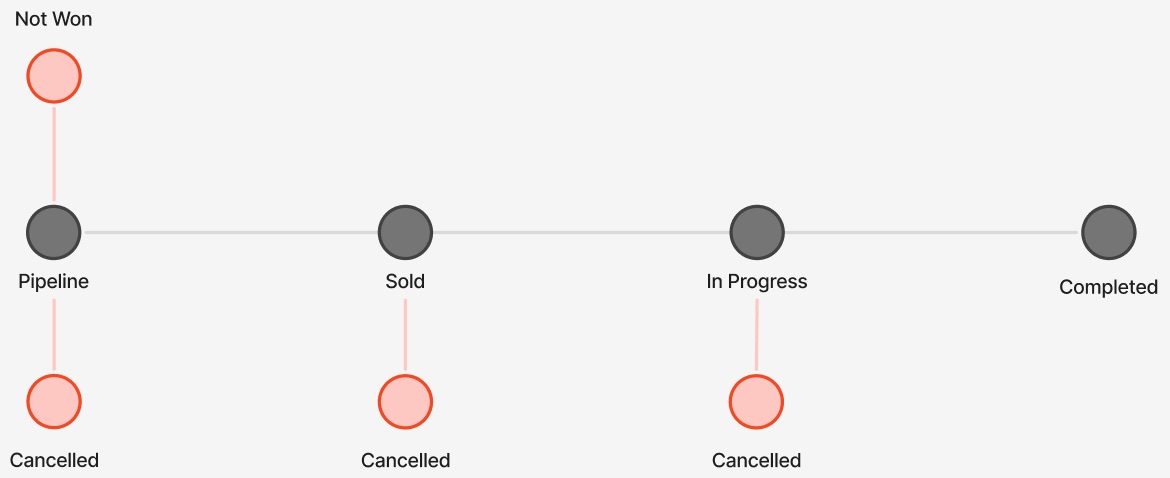
Each project on Consult has a set number of stages in their life cycle. Assuming that a project is sold and successfully completed, the life cycle flow will match the default as shown here:

Alternate end stages can be reached from each of these points:
Project stage descriptions
- Pipeline: Early-stage opportunity, with a win probability of either
Low,Medium, orHigh. - Proposed (deprecated): Proposal submitted and awaiting outcome.
- Awaiting order (deprecated): Proposal agreed to, pending purchase order.
- Sold: Project sold and ready to start.
- In progress: Active delivery stage.
- Completed: Work finished; terminal stage.
- Cancelled: Project stopped; terminal stage.
- Not won: Opportunity lost; terminal stage.
Timesheets and project duration matrix
For some project stages, users assigned to the project might see it in their timesheets but not be able to capture any hours on it. The duration of the project (start and end date) is also not editable during certain stages.
The table below summarizes the relationship between stages and timesheet capturing and project date editing.
| Stage | Timesheet hour capturing | Project duration editable |
|---|---|---|
| Pipeline | Allowed if allocations exist and pre-sold capture is enabled by PM (see work at risk). | Yes |
| Sold | Fully allowed. | Yes |
| In Progress | Fully allowed. | Yes |
| Completed | Blocked unless the project is extended or re-opened. | No |
| Cancelled | Blocked; resources are inactive. | No |
| Not won | Blocked; resources are inactive. | No |
TIP
Re-opening a terminal project restores editability and re-enables allocations and timesheet capturing.