
Appearance
Approve leave requests
Managers can approve or decline employee leave requests directly from the Inbox page.
You can access this page from the top navigation by clicking on the inbox icon:
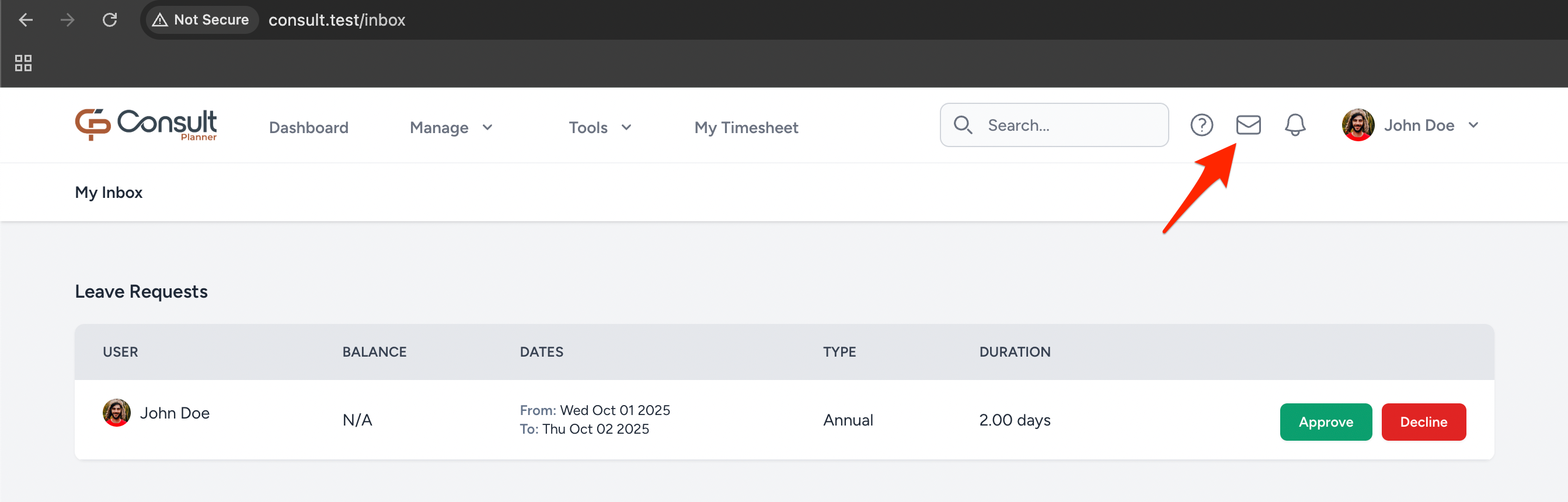
Pending leave requests
Each pending leave request includes the following details:
| Column | Description |
|---|---|
| User | The employee requesting leave. |
| Balance | Shows available leave balance. |
| Dates | The date range for the leave request. |
| Type | The category of leave (e.g., Annual, Sick). |
| Duration | The total number of leave days requested. |
Click on the Approve button to approve a leave request.
After approval
When a leave request is approved:
The employee’s leave record is updated automatically.
Email notifications are sent to the employee and their project managers for the projects where they have been planned against the leave period.
The project manager will not receive notifications if the PM notifications option is disabled in the project advanced tab.
The approved leave appears in the Leave calendar and Reports pages.
Declined requests
When a leave request is declined:
- The employee receives an email notification that the leave request has been rejected.
- The declined request remains visible to the employee.
Automatic declines
A leave request is automatically declined if a leave request is not approved within 10 days and the start date is more than 3 days in the past.